Forgot your PIN
If you forget your parent PIN, you can set a new one. Your children’s progress, Stars, heroes and pass are all kept. Only the PIN changes.
Which way you take depends on whether your parent phone has the Lifetime Pass.
| Your parent phone | What you do |
|---|---|
| Has the Lifetime Pass | Type your license key. You can set a new PIN straight away. |
| Free plan, no pass | Start a 24-hour wait. After it, set a new PIN. |
If you have the Lifetime Pass
Section titled “If you have the Lifetime Pass”- On the PIN box (it says Parental Gate), tap Forgot PIN?.
- Type your license key. Capital letters and spaces do not matter.
- Tap Check key.
- Type a new 4-digit PIN, then type it again.
- Tap Save new PIN.
The key is checked on your phone, so you do not need internet.
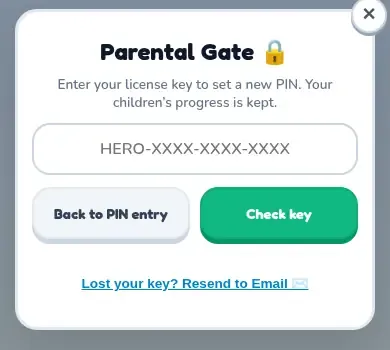
A wrong key counts like a wrong PIN. After several wrong tries, the box locks for a while and tells you how long to wait.
If you are on the free plan
Section titled “If you are on the free plan”- On the PIN box, tap Forgot PIN?.
- Tap Start 24-hour wait.
- The screen says You can set a new PIN after a time. You can close the app. The wait keeps counting.
- When the time has passed, open TimesHero and tap Forgot PIN? again.
- Tap Set a new PIN.
- Type a new 4-digit PIN, then type it again.
- Tap Save new PIN.
Other things to know
Section titled “Other things to know”- Resetting a PIN does not delete anything.
- PIN reset only works on the parent phone. A child’s own tablet has no parent area, and it says PIN reset is not available on this device. Use the parent’s own device.
- If the pass on your phone was refunded, the phone counts as a free phone. Use the 24-hour wait.
- Please do not wipe the app to get around a forgotten PIN. That would erase your children’s progress.
More help: If something goes wrong.