Add children and choose heroes
Each child has their own profile. A profile holds their first name, school year, hero and progress. Children do not share progress.
How many children can I add?
Section titled “How many children can I add?”- Free plan: 1 child profile. This is the profile you made at setup.
- Lifetime Pass: up to 4 child profiles.
If you are on the free plan and tap Add Child, TimesHero tells you the free plan includes 1 profile and offers two choices. Go to Parent Mode & Unlock takes you to the Parent Dashboard. Continue with 1 Profile closes the message. See Free plan or Lifetime Pass.
Add a child
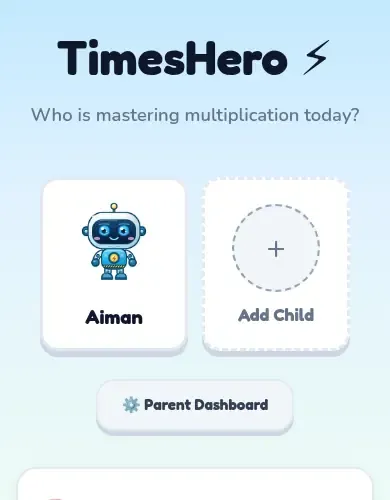
Section titled “Add a child”- Open TimesHero to the first screen. It says Who is mastering multiplication today?
- Tap Add Child.
- Type your parent PIN when asked.
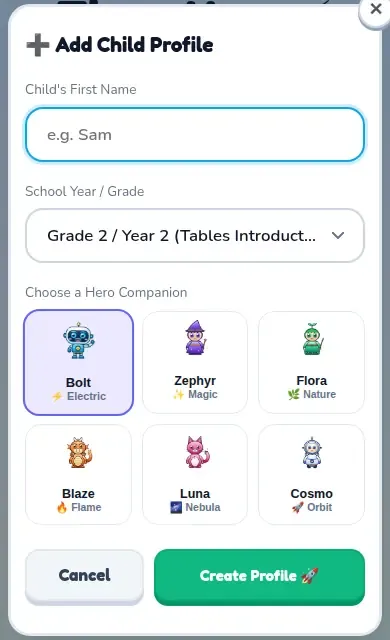
- Type the child’s first name.
- Choose their School Year / Grade. Pick the one closest to their school year.
- Choose a Hero Companion.
- Tap Create Profile.
Choose a hero
Section titled “Choose a hero”Every child has a hero companion that grows as they learn. There are six heroes.
| Hero | Who can pick it |
|---|---|
| Bolt, Zephyr and Flora | Everyone, including the free plan |
| Blaze, Luna and Cosmo | Families with the Lifetime Pass (shown with a crown) |
Remove a child
Section titled “Remove a child”- Open the Parent Dashboard and type your PIN.
- Pick the child at the top of the page.
- Tap Delete Profile and confirm.